

Realistic Talking Character Motion Prompt
Keep a presenter attentive and physically believable while treating speech timing as a separate production requirement.
Open the related free tool →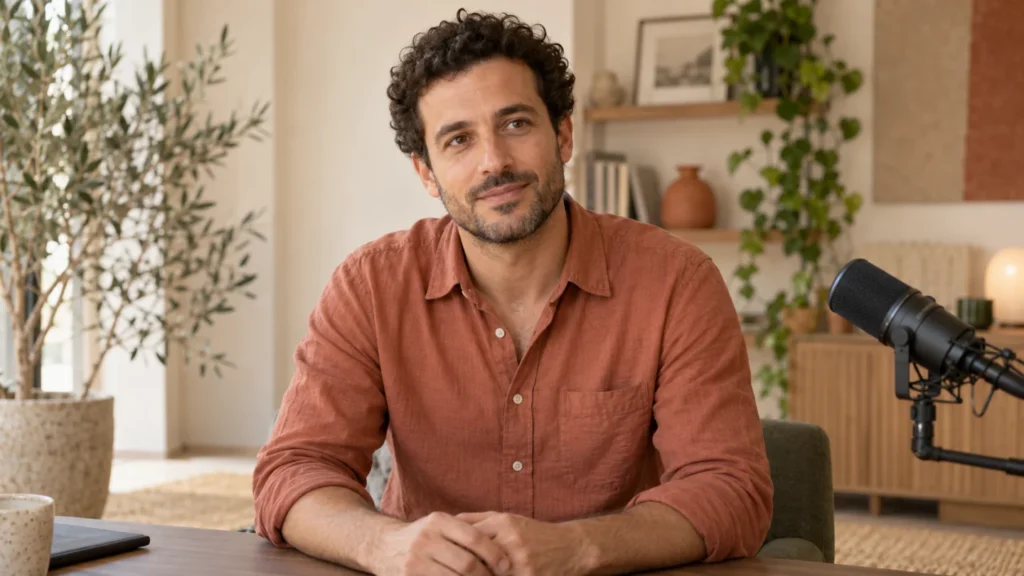
What this prompt is for
Use this motion brief with a compatible dialogue or audio-driven lip-sync workflow. Prepare an approved script and authorized voice recording first. The prompt controls the intended performance; it does not create voice rights or make mouth shapes align automatically with a soundtrack.
Prepare your variables
| Variable | What to supply |
|---|---|
| CHARACTER / REFERENCE | An authorized image or character reference with a clear, unobstructed mouth. |
| SCRIPT / AUDIO | A short approved line and an audio track you have permission to use. |
| EYE LINE | Direct to lens or a fixed off-camera interviewer. |
| EXPRESSION | A restrained emotional tone appropriate to the line. |
| PAUSES | Where the mouth should return to rest and the breath should occur. |
Full prompt template
Use the supplied character reference and approved [AUDIO OR DIALOGUE INPUT] in a supported speech workflow. Deliver [SHORT SCRIPT] in a [DURATION]-second [SHOT TYPE].
Maintain the same facial proportions, hairstyle, wardrobe and skin detail. Keep the eye line toward [TARGET], with occasional natural blinks and brief motivated attention changes.
Speech: align visible mouth motion with the provided speech through the model’s supported audio/lip-sync controls. Lips and jaw should return toward a relaxed resting position during pauses. Avoid opening the mouth repeatedly when there is no speech.
Performance: [RESTRAINED EXPRESSION]. Use small head movements at meaningful phrase boundaries and gentle breathing in the shoulders and upper chest. Keep hands still or use one simple approved gesture.
Camera: locked, at eye level. Maintain consistent lighting, background and body position. Finish with a short attentive hold after the line. Do not introduce cuts or an unrelated reaction.
Negative instructions
Mouth moving during silence, constant smiling, repeated nodding, asynchronous lips, changing teeth, face morphing, excessive blinking, frozen gaze, exaggerated shoulder bouncing, extra fingers, unmotivated camera movement.
Use a dedicated negative field only when the selected model supports one. Otherwise describe the desired stable behavior positively in the main prompt.
Filled example
An adult presenter in a terracotta shirt faces the lens in a quiet studio, medium close-up. Use an authorized six-second audio recording of “Here is the one setting I would change first.” Keep the tone calm and helpful. Allow a small head movement on “one setting,” one natural blink between phrases and gentle breathing. Keep the mouth at rest during the brief pause after the line. Hands stay on the desk. Lock the camera and preserve the reference identity, shirt and warm studio light. Review lip sync against the actual audio before exporting.
Target result and acceptance check
A restrained presenter performance with speech driven by the supplied audio where supported. The filled example is a production brief, not evidence that a particular generator achieved accurate lip sync.
- Watch once at normal speed for the intended action.
- Inspect the beginning, middle and end for face, hands, objects and background changes.
- Compare with your reference and brief. Keep the prompt, settings and reference together so revisions can change one factor at a time.
If the first result fails
Mouth motion continues in silence
Check the audio boundaries and the model’s dialogue controls. Trim leading/trailing silence or use a dedicated lip-sync pass.
The presenter keeps nodding
Remove generic “engaging” language and allow only one head movement at a specified phrase.
Teeth or jaw change
Use a smaller mouth-opening range and a clearer source image. Inspect each visible syllable in the final clip.
The voice sounds fine but lips lag
Compare the exported audio and picture together. Do not judge synchronization from a silent preview.
Frequently asked questions
Can this create an exact voice from text?
No. This is a motion prompt. Voice generation or recording is a separate step with its own permission and quality requirements.
Should the presenter blink on a fixed schedule?
A rigid pattern can look mechanical. Ask for occasional natural blinks and inspect the result.
Can I use a real person’s face?
Use an identity and voice you own or have permission to animate. Do not imply that a real person said or endorsed something they did not.
Continue with a practical next step
Created by AI Craft Pad. Contact or report an issue. Check the current generator controls and review the output before use.