

Image-to-Video Cinematic Motion Prompt
Animate the moment inside a still image while giving the face, clothing and background a clear continuity brief.
Open the related free tool →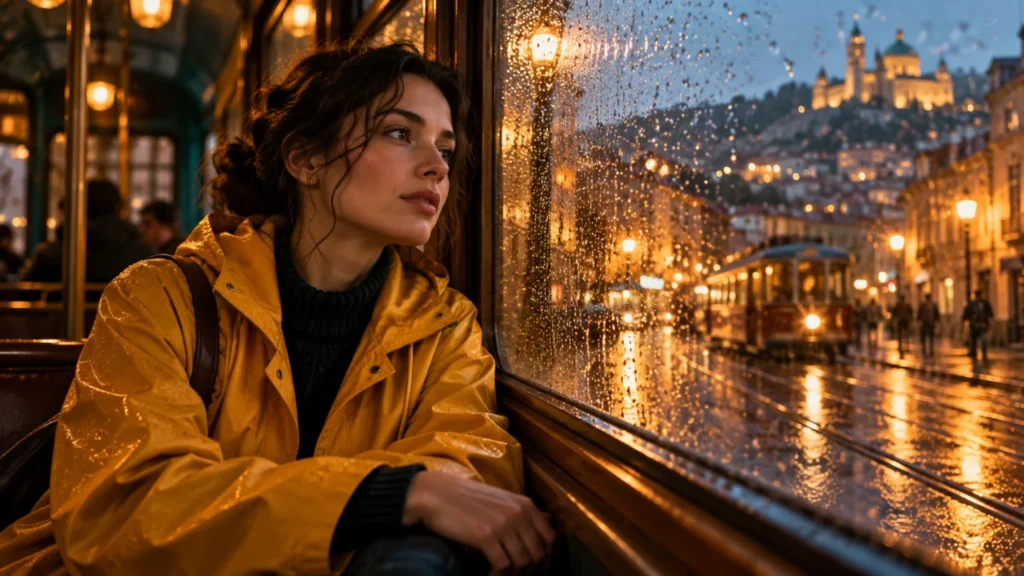
What this prompt is for
Use this template when a source image already has the composition you want and the missing ingredient is a small, believable passage of time. It suits a portrait, a traveler at a window or an environmental character shot. It is less suitable for a new camera angle that reveals large areas missing from the reference.
Prepare your variables
| Variable | What to supply |
|---|---|
| REFERENCE | An owned or authorized source image; identify the main subject and visible details. |
| ACTION | One visible event that fits the starting pose. |
| EYE LINE | A target inside the scene, with natural blinks rather than constant eye movement. |
| CAMERA | One small push, slide or locked shot. |
| ATMOSPHERE | A limited background motion, such as drifting mist or rain. |
| DURATION / RATIO | Use settings the chosen video model actually offers. |
Full prompt template
Use the supplied reference image as the visual anchor for one continuous [DURATION]-second shot in [RATIO].
Subject: [SUBJECT AND STARTING POSE]. Preserve recognizable face structure, hairstyle, clothing seams, accessories and the visible arrangement of the scene.
Action: [ONE PRIMARY ACTION]. Start from the pose in the reference; do not jump to a new pose in the first frame.
Eyes: maintain [EYE LINE]. Allow occasional natural blinks and a small attention shift motivated by the action.
Head and body: [RESTRAINED HEAD MOVEMENT]. Use subtle breathing through the chest and shoulders; keep weight and balance plausible.
Camera: [ONE CAMERA MOVE]. Keep movement smooth and limited enough to preserve scene geometry.
Light and atmosphere: maintain the source lighting direction and exposure. Add only [SMALL ENVIRONMENTAL MOTION].
Timing: establish the image, develop the action once, then settle into a readable end pose. Keep the face, clothes and background coherent across the entire clip.
Set supported duration, ratio and reference strength controls in the generator interface.
Negative instructions
Identity changes, facial warping, mismatched eyes, duplicate limbs, clothing redesign, melting background geometry, exposure flicker, sudden camera jumps, unintended cuts, new text or logos.
Use a dedicated negative field only when the selected model supports one. Otherwise describe the desired stable behavior positively in the main prompt.
Filled example
Reference: an adult traveler in a saffron raincoat seated beside a rain-covered tram window.
Create a six-second 16:9 continuous shot. Begin from the reference pose. The traveler keeps looking through the window, blinks once naturally and turns the head a few degrees toward a passing light. Breathing gently moves the collar and shoulders. Keep both hands resting by the window. Use a very slow forward camera move. A few raindrops slide down the glass; distant lights remain soft. Keep face proportions, coat seams, window frame and warm interior light stable. Let the movement settle during the last second. Add no speech or new text.
Target result and acceptance check
A restrained shot with a readable attention shift, visible breathing and limited environmental movement. The cover is an illustration; this filled prompt has not been presented as a tested video render.
- Watch once at normal speed for the intended action.
- Inspect the beginning, middle and end for face, hands, objects and background changes.
- Compare with your reference and brief. Keep the prompt, settings and reference together so revisions can change one factor at a time.
If the first result fails
Face changes during the push
Lock the camera and keep the performance unchanged. If that helps, reintroduce a shorter camera move.
Hands drift or multiply
Keep hands still or outside the crop. Do not add a second gesture to hide the error.
The whole scene moves as one flat layer
Request one distinct physical action in the subject and one small environmental motion; a pan alone is not character animation.
Highlights pulse
Remove changing-light instructions and hold exposure stable.
Frequently asked questions
Can a prompt guarantee the same face?
No. References and restrained motion can help define the goal, but identity must be reviewed throughout the clip.
Should I describe every pixel?
No. Name the details that matter for identity and continuity. Repeating the entire image description can compete with the motion instructions.
Is a slow zoom enough?
Only when that is the intended result. For a living character shot, inspect whether eyes, breathing and posture actually change rather than accepting camera movement alone.
Continue with a practical next step
Created by AI Craft Pad. Contact or report an issue. Check the current generator controls and review the output before use.