

Floating Market Miniature Diorama Prompt
A detailed floating market diorama prompt for a readable miniature scene with boats, stalls and believable circulation.
Floating Market Miniature Diorama Prompt
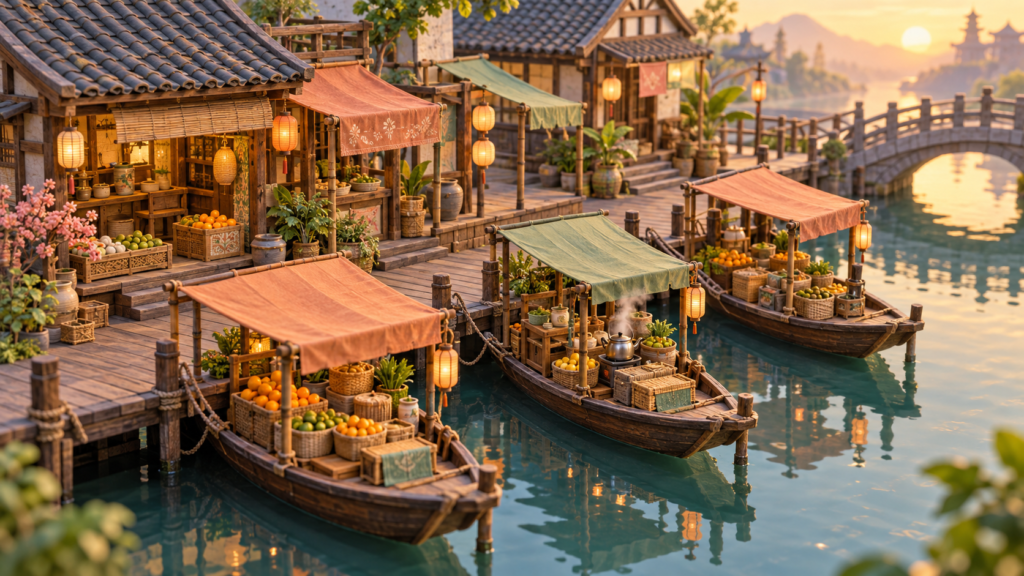
The floating market miniature diorama prompt below turns a busy location into a readable small world. It asks for purposeful props, clear boat routes and physical connections, so the scene feels made rather than randomly decorated.
Copy the floating market miniature diorama prompt
Create an original three-quarter overhead diorama of a fictional floating market at dawn. Arrange three small wooden produce boats along a narrow canal boardwalk. Give each boat a different purpose: citrus and herbs, flowers and wrapped goods, and a tea stall with one modest kettle. Use muted coral and sage fabric canopies, tiled roofs, a few hanging lanterns, and warm light touching the water. The boats must be tied to visible posts with believable ropes and enough open channel for a boat to pass. Show one short bridge or landing that connects the boardwalk to the buildings.
Keep the miniature scale consistent from boat to basket to lantern. Make the market readable at thumbnail size with a clear visual path from the front boat toward the background bridge. Use tactile wood, fabric, clay roof tiles and water surfaces; allow small handmade imperfections without warped architecture. Include a few human-scale clues such as a stool or cup, but do not fill the scene with crowds. No floating baskets, disconnected stairs, unreadable text, real shop logos, copied landmarks, or watermark. Return one wide hero view and one closer crop of the central boat using the same arrangement.
Three controlled scene variations
- Change dawn to a soft rainy morning while keeping boat count, moorings and stall ownership unchanged.
- Create a twilight lantern edition with the same bridge and circulation path.
- Turn the market into an autumn produce scene by changing goods and fabric tones, not the architecture.
Readability and layout review
Trace the route a visitor would take from the landing to each stall. There should be room to step onto a boat or buy from the boardwalk without crossing through water. Check the bridge supports, roof overhangs and ropes from the selected camera angle. If a boat looks merged into the pier, separate its hull shadow and water reflection. The floating market miniature diorama should feel like one navigable place rather than a collage of attractive stalls.
Use light to guide attention. The closest citrus boat can be brightest, while background buildings remain quieter. Warm lanterns may add depth but should not create conflicting shadows. Review repeated objects: baskets should have plausible handles, cloth canopies should attach to poles, and fruit should not spill without a surface beneath it. Remove decorative clutter if it hides the purpose of a stall.
How to refine the miniature
Start with a simple blockout before increasing detail. Mark the canal edges, three boat silhouettes, the bridge and the viewing angle. Run a first generation with plain materials. If the boats overlap or the bridge is hidden, revise the arrangement before adding fruit, canopies or lanterns. This staged approach keeps the main composition from disappearing under decorative objects.
For a second pass, change one variable at a time. You can adjust the dawn color temperature, widen the landing, or move a canopy, then compare the result with the original route. Save the version that reads best at small size. If your image tool supports a reference image, use the approved composition as the anchor and state which features must remain fixed.
Preparing a series or game environment
Keep a short scene bible with the three boat roles, bridge position, canal width, palette and camera angle. This helps a later market view stay consistent. For a game asset, test the composition at the actual screen size and identify which objects would be interactive before modeling them in detail. For an illustration, inspect the scene as a small card and as a full image. Do not claim the render is a tested 3D game level; it is concept art until its geometry and pathing are built.
Give the finished preview descriptive alt text following the W3C image accessibility tutorial. Browse related AI Craft Pad prompts.