

Community Garden Planner Desktop App Builder Prompt
Plan an offline desktop app for garden beds, seasonal crops and shared volunteer tasks.
Community Garden Planner Desktop App Builder Prompt
The community garden planner desktop app prompt defines a practical offline tool for a small volunteer group. It covers garden beds, a seasonal crop calendar and task handoffs without requiring accounts or cloud services. The output should be working source code and a testable prototype.
Copy the community garden planner desktop app prompt
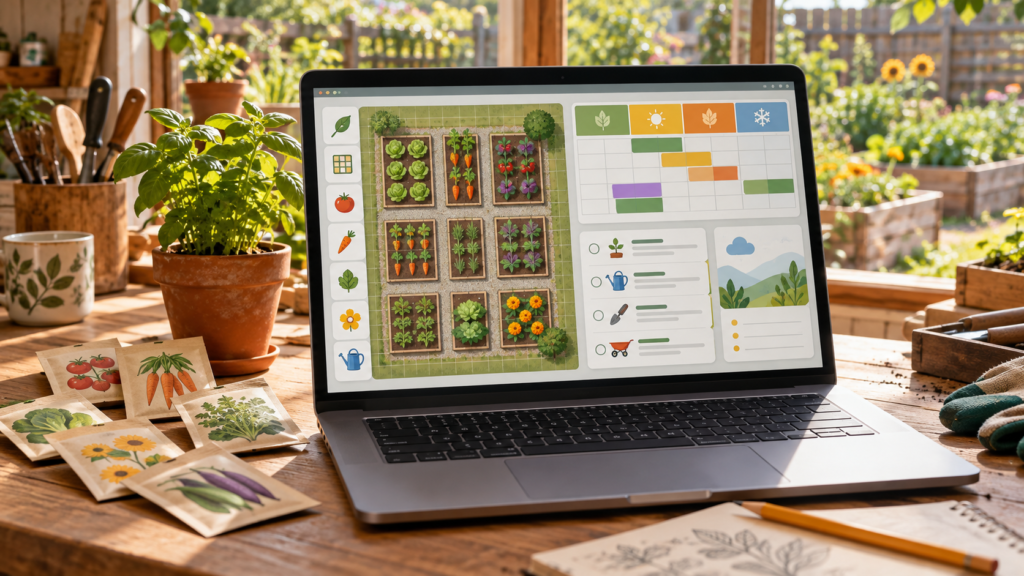
Build an original desktop app called Garden Commons Planner for Windows, macOS or Linux using a documented cross-platform framework. It must work offline and store all project data in a local file or database chosen by the user. The main screen has a simple bed map: create rectangular beds, name them, set dimensions, assign crops and mark paths that cannot be planted. A second screen is a seasonal calendar showing sow, transplant and harvest windows. A third screen is a volunteer task board with task title, due date, status and an optional first name or nickname. Do not require real names, email, location sharing, login or telemetry.
Provide create, edit, duplicate and archive actions for beds and crop plans. Validate dates and dimensions before saving. Make it easy to print a one-page garden map and export the calendar and tasks as CSV. Import must preview changes and avoid silently replacing existing data. Include a local backup and restore flow with a clear confirmation before restore. Use sample data for a fictional garden in the demo, with three beds and three crops. Return source code, setup instructions, a packaging command and a short manual test plan. Do not claim that an installer exists until it has been built and checked.
Design the offline planning workflow
Begin with a tiny data model: garden, bed, crop plan and task. Each bed has an identifier and dimensions. Each crop plan links to one bed and a date range. Tasks may link to a bed or remain general. Keep IDs stable when the user renames a bed, so the calendar and task board do not lose their links. Archive completed plans instead of deleting them from historical exports.
Make the map usable before adding decorative detail. Users should see bed names and dimensions without zooming into a tiny shape. Provide a list view alongside the map for keyboard users and small screens. The calendar should show overlapping planting windows clearly and flag a conflict when two crops occupy the same bed at the same time. Warnings should explain the conflict without guessing local climate rules.
Three controlled variations
- Create a classroom demonstration with four sample beds and no volunteer names.
- Add a seed inventory screen only after the bed map and calendar pass their tests.
- Offer a printer-friendly black-and-white map without changing the saved garden data.
Quality review and next steps
Test a full session: create a bed, assign a crop, add a volunteer task, save, close the app and reopen it. Confirm the map, calendar and task still agree. Change the bed name and verify linked items remain attached. Try invalid dimensions, a harvest date before sowing and duplicate imports; each should produce a useful message without corrupting data.
Export CSV and open it in a spreadsheet to check headers, encoding and dates. Print the map to PDF and confirm text is legible in grayscale. Back up the data, make a harmless change, restore the backup and check that the original version returns. These tests matter more than a polished mockup.
Provide keyboard navigation, visible focus indicators and labels for every control. Use text and patterns along with crop colors. Keep local files in a user-selected location and document the data format so a garden group can move its records later. If the app depends on a framework runtime, list that requirement clearly in the setup instructions.
The image is a concept mockup for the requested app, not a working screenshot. Ask the coding assistant to report what was actually built and tested. A first version should deliver the three core screens and reliable local data handling before adding weather services, accounts or collaboration features.
Browse more original ideas in the AI Craft Pad prompt library. For desktop interface accessibility, review the W3C WCAG overview.