

Bioluminescent Ocean Drift Video Prompt
Direct a silent 15-second underwater drift with jellyfish, stable ocean geography and restrained bioluminescent light.
Bioluminescent Ocean Drift Video Prompt
Use this bioluminescent ocean drift prompt to develop an original silent short video with clear constraints and review checks.
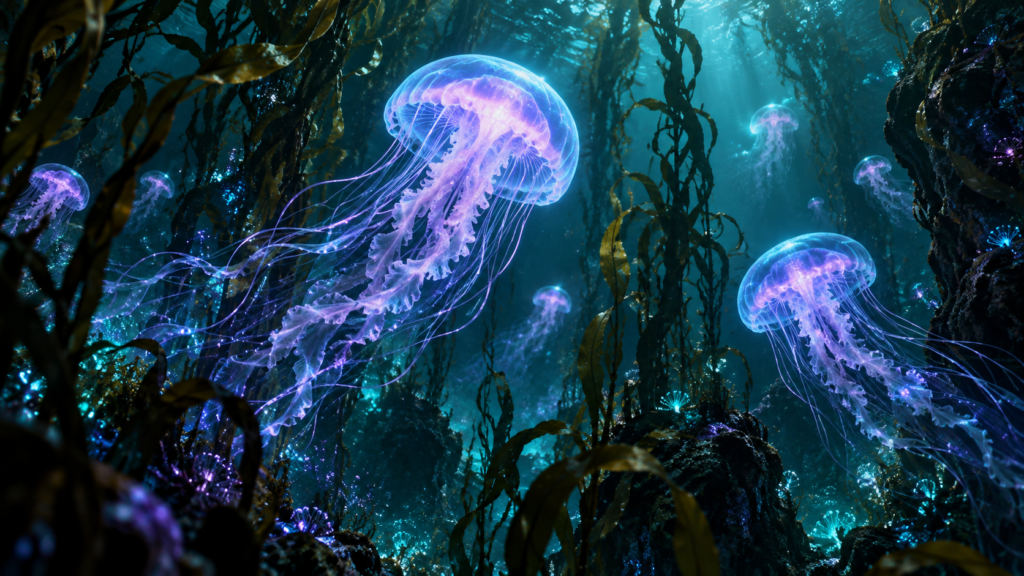
The original cover art establishes the color and mood for a possible underwater clip. It is a concept frame, not a verified video result.
bioluminescent ocean drift prompt
Create a 15-second silent underwater scene inside one continuous kelp forest. Three translucent jellyfish drift slowly from the lower right toward the upper left while the camera glides forward at walking pace. At 0–5 seconds, reveal the nearest jellyfish against dark kelp. At 5–10 seconds, pass through a narrow gap and show a second jellyfish farther away. At 10–15 seconds, settle on a wider view with the third jellyfish deep in the water. Keep the same jellyfish count, scale logic and swimming direction throughout. Use restrained teal and violet bioluminescence, suspended particles and natural water haze. No abrupt cuts, impossible tentacle tangles, extra sea creatures, captions, audio or watermark.
Controlled variations
- Use a more documentary palette with weaker glow.
- Keep the same path but move the camera more slowly.
- Create a seamless loop by matching the first and last camera position.
Test the motion
Review the motion frame by frame for duplicated jellyfish, stretched tentacles and changing kelp structure. For a loop, trim only when the opening and closing compositions align.
Quality check
Watch the exported clip at its intended size and inspect the first, middle and final frames. Check duration, subject continuity, camera direction and the absence of accidental lettering. The result depends on the video tool and may need several runs; the still cover does not demonstrate motion quality.
Explore more AI Craft Pad prompts.
Shot plan and continuity checks
Keep the camera path slow and continuous so the viewer can understand the kelp forest as one space. Begin with the nearest jellyfish partly framed by dark kelp, then let the second and third subjects emerge from depth as the camera moves forward. Avoid a sudden scale jump between the three beats. The nearer animal may appear larger because of perspective, but its bell shape, tentacle count, and swimming rhythm should remain stable from frame to frame.
Use the teal and violet glow as a restrained light source, not as a neon outline pasted onto the water. Kelp in front of a jellyfish should briefly occlude it; particles should drift at a different speed from the camera to make the depth believable. Keep the water haze consistent and prevent the background from snapping to a new layout halfway through the shot. The scene should feel like a quiet observation rather than a fast montage.
Review the first five seconds for a clear opening subject, the middle five for a readable passage through the kelp, and the final five for a wider composition that reveals the third jellyfish. Inspect individual frames at each transition point. Watch for multiplied bells, merged tentacles, sudden changes in swimming direction, and objects that disappear behind the wrong layer. If those faults appear, simplify the motion or shorten the camera travel instead of adding more creatures.
For a loop, compare the first and last frames side by side. Match camera position, kelp overlap, particle drift, and the jellyfish positions closely enough that the return to the opening frame is gentle. Export one 15-second silent version and one still frame for preview. Label the still as concept art if the video itself has not been generated or checked. Do not imply that the prompt guarantees a finished clip; quality depends on the video model and review of its output.
When publishing the bioluminescent ocean drift result, review a text description and accessible presentation for the preview with the W3C media accessibility guidance. Check the final output before presenting it as finished work.