

Local TTS Studio
Your words. A local voice.
Free offline text to speech for Windows, with translation into five languages.
Speech that stays on your computer
Create voiceovers for videos, learning materials, drafts and personal listening. Your text, translated script and generated audio are processed locally. No subscription, paid API or cloud GPU is required.
Choose your voice
Ten voices, five female and five male. Adjust speech speed from 0.50× to 1.50×.
Speak in five languages
English, Spanish, Russian, French and German. A script in another supported language is translated locally; your original text stays unchanged.
Keep your audio
Generate, play, stop and save a WAV file. Inspect the generated wording with Spoken text before sharing a voiceover.
See the real desktop app
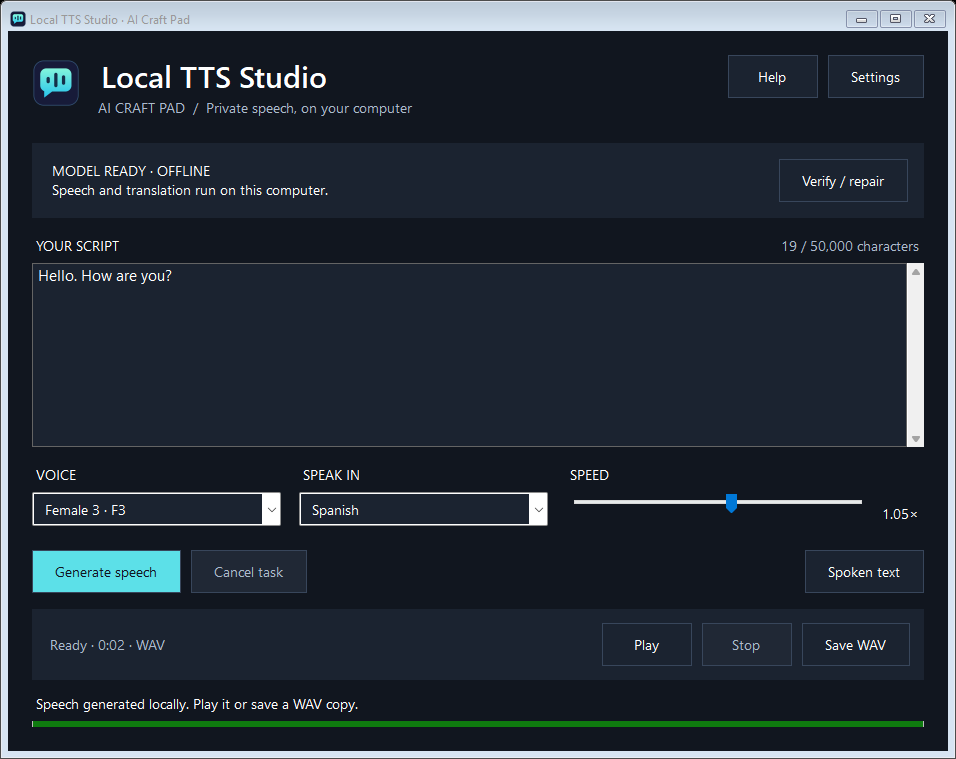
Real application screenshot. “Hello. How are you?” is spoken as “Hola. ¿Cómo estás?” while the text field keeps the original English script.
Download Local TTS Studio 0.3.1
Choose the installer for a regular installation, or the portable version to keep the program and its data together in one folder. Both downloads include the guide, copyright notices and full dependency licenses.
Installer: extract the ZIP, run LocalTTSStudio-0.3.1-Setup.exe, then use the desktop shortcut. Close an older copy and its tray icon before updating.
Portable: extract the entire ZIP into a writable folder and run LocalTTSStudio.exe. Keep LocalTTSEngine.exe and the other files beside it. Models and settings live in the data subfolder.
The build is not digitally signed; Windows may display an unknown-publisher prompt. Download it only from this page. Python does not need to be installed separately.
Verify the download and inspect the source
Download MIT-licensed application source · 196 KB
Installer ZIP SHA-256:
0bec94e52e6d9344d1de090213de332f44f7ad42e752710746148bfa3eabf600
Portable ZIP SHA-256:
3f80da34142679b2cf999511a22ed410c3ef3a138ab65d9a2ef38cae6efa74bc
Your first voiceover
- Choose Install model. The speech model downloads about 401 MB once.
- Enter your script, select a voice and adjust the speed.
- Choose Speak in. If translation needs another model, review and approve its download.
- Choose Generate speech, inspect Spoken text and listen with Play.
- Choose Save WAV to keep the result.
The program includes Help → User guide (F1), Help → About and a full license viewer. Progress, cancellation, settings and download errors are shown in the app.
System requirements
- Windows 10 or 11, 64 bit; .NET Framework 4.8.
- 4 GB RAM minimum; 8 GB recommended.
- A modern x64 CPU compatible with the bundled inference runtime. No discrete GPU required.
- At least 1 GB free for initial speech setup; allow 3 GB if downloading all translation models.
- Internet for initial model downloads; offline generation afterward.
English → Spanish translation adds about 87.5 MB. Downloads vary by language; all eight translation packages total about 960 MB. Pairs between two non-English languages use English as an intermediate language.
Questions, privacy and licenses
Does changing the language translate my script?
Yes. The selected Speak in language controls the generated speech. Translation happens on your computer and leaves the source field unchanged. Review Spoken text: machine translation may make mistakes. For very short or ambiguous input, set the source language explicitly in Settings.
Will it work without the internet?
Yes, after the required speech and translation models are downloaded. Text and audio are not sent to AI Craft Pad or a hosted inference API. Verify / repair and initial model downloads need internet.
Who made it, and what rights apply?
Created and published by AI Craft Pad. Copyright © 2026 AI Craft Pad contributors. Application code and its original speech-bubble icon are MIT licensed. Supertonic code is MIT; speech weights and voice styles use BigScience OpenRAIL-M, including its use restrictions. Translation uses CTranslate2 (MIT), SentencePiece and langdetect (Apache 2.0). Argos packages have MIT/CC0 notices, with OPUS-MT CC BY 4.0 attribution where applicable. Complete license texts are bundled and available under Help → About → Full licenses.
Commercial use and distribution are subject to the respective component and model licenses. You remain responsible for your source content and how generated audio is used. Software is provided as-is, without warranty.
What has been tested?
Version 0.3.1 passed local Windows 11 checks for real synthesis, English-to-Spanish translation, Russian speech, all eight translation models, playback, WAV export, cancellation, retained audio, settings, installation, portable startup, native icon registration and layouts at 100%, 125%, 150% and 200%. Windows 10 and older CPU families have not been physically tested.
What if something goes wrong?
Check free disk space and the internet connection during setup. Use Verify / repair for speech-model files. Use Settings to choose the source language or a writable model folder. The app keeps diagnostics.log in its data folder. Translation and voice quality vary by script: try a short sample first.
