

AI Workflow vs Prompt: What’s the Difference and When Do You Need Each?
Understand the practical difference between a prompt and an AI workflow, when a single prompt is enough, and when a repeatable multi-step process is the better tool.
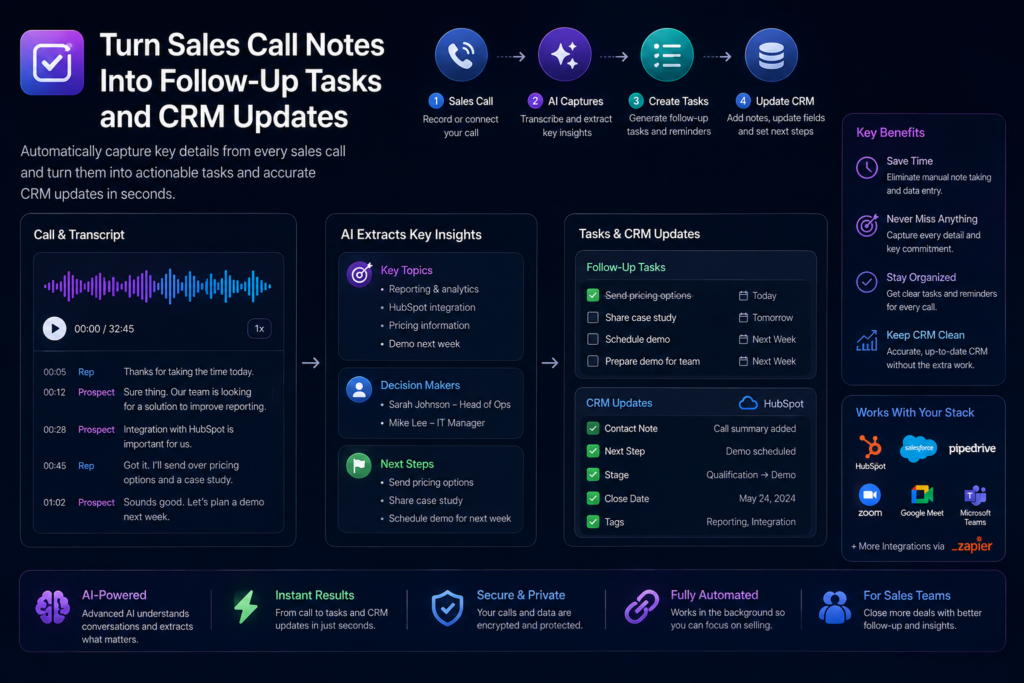
Quick answer: A prompt is an instruction for one AI interaction. A workflow is a repeatable process that combines inputs, one or more transformations, tools, checks, decisions, and an expected result. Use a prompt when the task is self-contained. Use a workflow when the work has multiple stages, recurring inputs, verification, handoffs, or automation.
What a prompt does
A good prompt defines what the model should do with the information you provide. For example: turn meeting notes into an executive summary, draft a customer email from approved facts, or compare vendors using a supplied scorecard.
The prompt can be detailed, but the interaction is still centered on one transformation.
What a workflow adds
A workflow defines what happens before and after the AI response. It may include collecting data, cleaning an input, selecting a tool, running a prompt, checking the result, asking for approval, storing the output, and triggering the next step.
This makes the process repeatable rather than dependent on one person remembering how to use a prompt correctly.
When a prompt is enough
- The task is occasional.
- The input is already available.
- One person can review the result immediately.
- The output does not need to move automatically into another system.
- The cost of a mistake is low and easy to reverse.
Examples include rewriting an email, creating an outline from notes, summarizing a document, or brainstorming questions for an interview.
When you need a workflow
- The task repeats on a schedule or trigger.
- Several sources or tools are involved.
- The output must be structured consistently.
- There are required verification or approval steps.
- The result moves into CRM, email, a database, a project system, or another automation.
- Different people need to run the process consistently.
Example: meeting follow-up
A prompt might say: “Turn this transcript into decisions and action items.” A workflow starts earlier and ends later: capture the transcript, clean speaker labels, run the extraction prompt, verify decisions against the transcript, draft the follow-up email, approve the actions, then save them to the project system.
Why people automate too early
A common mistake is to build automation before the manual process is reliable. If the prompt, input format, or quality check changes every time, automation simply makes inconsistency faster.
Run the workflow manually first. Record the expected input, transformation, failure cases, review criteria, and final destination. Automate only the stable steps.
A simple progression
- Task: define the real outcome.
- Tool: choose where the work should happen.
- Prompt: define the AI transformation.
- Workflow: connect input, transformation, review, and delivery.
- Result: save, publish, send, or use the verified output.
Final takeaway
Prompts and workflows are not competing ideas. A prompt is often one component inside a workflow. Start with the smallest reliable solution: if one prompt solves the problem, use it. When repetition, handoffs, verification, or automation appear, turn that prompt into a workflow.
AI workflow vs prompt is easiest to apply when the goal, source material, and review standard are explicit. Understand the practical difference between a prompt and an AI workflow, when a single prompt is enough, and when a repeatable multi-step process is the better tool. The practical test is whether the method improves a real decision or workflow, not whether the AI produces a polished-looking answer.
A practical checklist for AI workflow vs prompt
- Define the outcome before choosing the AI tool or prompt.
- Use the best available source material and preserve links or references for important claims.
- Separate facts, assumptions, calculations, recommendations, and unknowns.
- Test the process on a small real example before making it routine.
- Keep a human review step for high-impact, sensitive, or irreversible decisions.
Questions to ask before you use the result
What information did the AI actually receive? Which parts of the answer are directly supported? What could have changed since the source was created? Are important numbers, names, dates, links, or quotations verified? Would another person understand the limitations of the output without seeing the original prompt?
For repeatable work, document the inputs, the prompt or workflow, the review criteria, and the final decision. That makes errors easier to spot and helps the process improve over time instead of relying on one successful run.
Use AI as part of the process, not the evidence
AI Workflow vs Prompt: What’s the Difference and When Do You Need Each? should help you work faster while keeping responsibility for the final output clear. AI is useful for organizing, comparing, drafting, and finding patterns, but source quality and human judgment still determine whether the result is trustworthy.
Related AI Craft Pad resources
For the next step, browse AI guides, practical prompts, or the AI tools directory.